
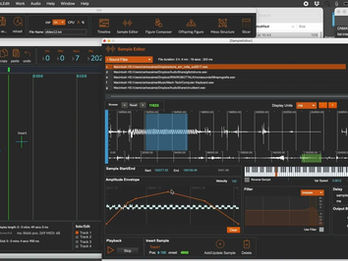
IRIN is a specialized, standalone audio composition and sound-editing program developed by Portuguese composer and professor Carlos Caires.
Unlike a standard Digital Audio Workstation (DAW) meant for traditional multitrack recording, IRIN is designed specifically for micromontage and granular / concatenative synthesis. It is widely used in electroacoustic music, computer-assisted composition, and experimental sound design.
Key Concepts & Features
IRIN was built using Max/MSP (a visual programming language for music and multimedia) and has been continually developed since around 2004 (originating during Caires' doctoral studies at the University of Paris VIII under the guidance of pioneering composer Horacio Vaggione).
The software is characterized by a few major architectural features:
-
Multilevel / Hierarchical Editing: IRIN allows a composer to smoothly bridge the microscopic and macroscopic levels of a musical piece. It structures audio using a layered approach:
-
Samples: Small fragments or regions selected from a master sound buffer.
-
Figures: Micro-time sound sequences created by encapsulating and organizing multiple samples.
-
Meso-structures: Collections of up to 8 figures grouped together for structural variations.
-
Timeline: The final, macro-level score where these complex, layered objects are arranged over time.
-
-
Micromontage Focus: It gives creators microscopic control, allowing them to shape, map, and algorithmically manipulate audio particles point by point.
-
Modern Updates: Over its lifespan, the software has expanded to support features like spectral slicing tools, multi-channel spatialization (up to 16 output channels), and a redesigned, modern timeline interface.
-
Availability
IRIN operates outside of traditional linear plugins (like VSTs) as a dedicated standalone environment and is available for both macOS and Windows platforms through Carlos Caires' dedicated IRIN webpage.
-


Publications
-
Caires, C. (2004). IRIN: Micromontage in graphical sound editing and mixing tool. In Proceedings of the International Computer Music Conference (ICMC 2004) (pp. 219–222). ICMC.
Open-access record / PDF -
Caires, C. (2003). Vers une écriture des processus de micromontage. In Actes des Journées d’Informatique Musicale 2003 (p. 10). École Nationale de Musique du Pays de Montbéliard, ADERIM.
Cited in
Books
-
Roads, C. (2023). The computer music tutorial (2nd ed.). The MIT Press.
MIT Press — The Computer Music Tutorial, 2nd edition -
Solomos, M. (2020). From music to sound: The emergence of sound in 20th- and 21st-century music. Routledge. https://doi.org/10.4324/9780429201110
Routledge — From Music to Sound -
Roads, C. (2015). Composing electronic music: A new aesthetic. Oxford University Press. https://doi.org/10.1093/acprof:oso/9780195373233.001.0001
Oxford Academic — Composing Electronic Music -
Solomos, M. (2007). Espaces composables: Essais sur la musique et la pensée musicale d’Horacio Vaggione. L’Harmattan.
L’Harmattan — Espaces composables
Articles
-
Blackburn, M. (2019). Working with brevity: Short soundfiles in electroacoustic composition. Proceedings of the International Computer Music Conference (ICMC). Keele University research record
-
Lorenzo, M. (2016). Composition des figures en tant que séquences d’événements finies déclarées comme variables d’environnement. Proceedings of the Journées d’Informatique Musicale (JIM).
-
Vesic, M., & Lopes, D. (2015). Electrical impulses. Proceedings of the Electronic Visualisation and the Arts (EVA London 2015), 138–139. https://doi.org/10.14236/ewic/eva2015.67
-
Einbond, A., Trapani, C., Agostini, A., Ghisi, D., & Schwarz, D. (2014). Fine-tuned control of concatenative synthesis with CataRT using the bach library for Max. Proceedings of the International Computer Music Conference (ICMC 2014). Open-access paper
-
Roads, C. (2012). From grains to forms. In M. Solomos (Ed.), Proceedings of the International Symposium Xenakis: La musique électroacoustique / Xenakis: The electroacoustic music. Université Paris 8. Full paper
-
Jette, C. (2011). In vitro oink: A composition for piano and Wii Remote. eContact!, 13(2). Communauté électroacoustique canadienne / Canadian Electroacoustic Community. Article
-
Vaggione, H. (2010). Représentations musicales numériques : Temporalités, objets, contextes. In A. Soulez & H. Vaggione (Eds.), Manières de faire des sons (pp. 45–82). L’Harmattan.
-
Lanzalone, S. (2008). Suoni scolpiti e sculture sonore: Alcuni esempi di installazioni d’arte elettroacustica. In Atti del XVII Colloquio di Informatica Musicale (pp. 149–156). AIMI. Proceedings / publication record
-
Brossier, P. M. (2007). Automatic annotation of musical audio for interactive applications [Doctoral dissertation, Queen Mary, University of London]. Centre for Digital Music. Thesis and PDF
-
de Sousa Dias, A., & Ferreira-Lopes, P. (2005). KITTy: A package for external patches communication management in Max/MSP—A progress report. In Proceedings of the International Computer Music Conference (ICMC 2005). University of Lisbon record
-
Roads, C. (2005). The art of articulation: The electroacoustic music of Horacio Vaggione. Contemporary Music Review, 24(4–5), 295–309. https://doi.org/10.1080/07494460500172121
Recent change log
3.2.1
18 March 2026
GUI for Granulator (spray icon) inside figure composer was improved
3.2.0
28 December 2025
Small but important fix: the Granulator (spray icon) inside figure composer was fixed to reflect the recent changes in the filter tool from the last update.
3.1.9
28 December 2025
Filter Tool in Figure Composer has been completely redesigned to fix several long-standing bugs and significantly improve its interface.
3.1.8
11 April 2025
Fixed bug related to Reaper synchronisation
3.1.7
20 January 2025
Fixed bug preventing delay and panning to playback properly
Fixed Bug related to Events Real Time recording into the timeline
Behaviour change concerning real time recording into the Timeline: Recorded sequences will be rendered on the Timeline after the recording is complete.
3.1.6
22 December 2024
Added option to set the bit rate of file in Bounce Audio
Major improvements in QuickRecord tool, Includind exporting in 16 channels
3.1.5
05 November 2024
Fixed an issue related to Reaper synchronization
Fixed and issue related to playback recording using keyboard input
Improved: option to edit delay times in the Timeline sample Editor (released in irin 3.1)
3.1.4
-
Fixed an issue related to sample colours for projects using more than 16 audio files.
-
Fixed and issue in the Slicer tool where the first slice could’nt be selected with the mouse
-
Fixed an issue where sample representation was limited to 1000 pixels wide
New: Sample editor shows sample duration according to transposition parameter
3.1.3
-
In Sample Editor, fixed a problem causing the 4 vertical buttons for Amplitude/Filter/Panning/Plugin not to work properly.
-
The “Amplitude Envelope” label was changed to “Envelopes”
3.1.2
Changes
Plugin Matrix set to dial mode (volume control per output)
Corrections
Fixed an issue preventing Slicer to set a root value for new samples
Fixed Slicer window display issue
Fixed Left Output of VST 6 (was disconnected)
Fixed shortcut to play samples in sample editor (Key P)
3.1.1
Corrections
-
Quick record input from timeline corrected
-
Addressed an issue causing clicks while Playback for long samples with delay
-
Auto select track 1 on startup or “new” file command
• 4. Timeline Editor Shows the name of the selected Plugin
3.1
-
New: Option to Reverse envelopes in Sample Editor
-
New: Record to Timeline Function [from the Sample Editor keyboard, or external midi keyboard: Press the red "Rec" button in the Timeline, start Playback, play the keyboard in "playback" mode. There's also a new tool to automatically assign diferent delay times to each sample while playback for recording]
-
New: Alert before recording into buffer
-
New: option to edit delay times in the Timeline sample Editor
3.0.9.2
22 April 2024
-
Sample editor window float button (stay on top)
-
Solved issue preventing auto stop recording in sample editor
-
Input/Record: auto save when recording reaches end of selection (not stoped manually)
-
Recall button (arrows) in sample editor is now attached to playback line, showing the selected sample